I2C 通信
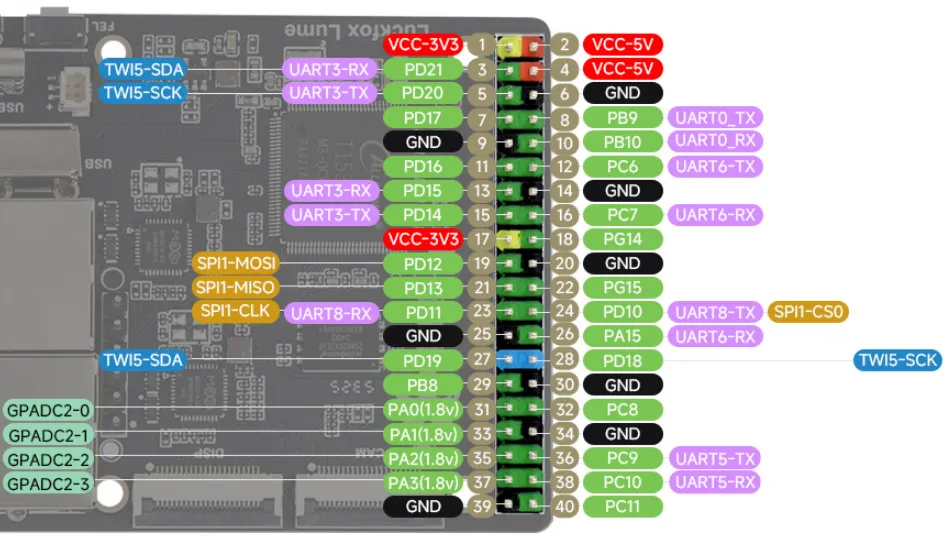
本章示例使用IIC设备:1.54inch Touch LCD Module
1. I2C 子系统
Luckfox Lume的I2C接口在SDK中称为TWI,本文使用TWI5,设备节点为 /dev/i2c-5。
/sys/bus/i2c/devices/:查看I2C适配器和已注册的从设备。/dev/i2c-*:用户空间访问I2C总线的接口。i2cdetect、i2cget:探测设备地址、读取寄存器。
2. I2C 测试(Shell)
2.1 引脚分布
| 物理引脚 | 复用功能 | GPIO | 说明 |
|---|---|---|---|
| 3 | TWI5-SDA | PD21 | 数据线 |
| 5 | TWI5-SCL | PD20 | 时钟线 |
| 1或17 | 3.3V | - | 外设供电 |
| 6、9等 | GND | - | 共地 |
2.2 查看设备
在 Linux 系统下,/sys/bus/i2c/devices/ 目录用于存放所有 I2C 总线适配器以及挂载的 I2C 从设备节点。
- 查看系统已注册的 I2C 总线:
root@luckfox:~# ls /sys/bus/i2c/devices/5-0045 5-005d i2c-5
- 查看 I2C 设备节点及总线名称:
root@luckfox:~# ls /dev/i2c-*/dev/i2c-5root@luckfox:~# i2cdetect -li2c-5 i2c SUNXI TWI(0x02515000) I2C adapter
目录下的文件夹命名分为两种类型:
- I2C 总线适配器(控制器):命名格式为
i2c‑X,X代表 I2C 总线编号;例如i2c‑1即编号为 1 的 I2C 总线。 - I2C 从机外设:命名格式为
X‑YYYY;X为所属总线编号,YYYY为从设备十六进制地址。
2.3 I2C 测试
-
查看 i2c-5 接口上的设备:
i2cdetect -a -y 5扫描结果中的十六进制数值为从设备地址;-- 表示未检测到设备,UU 表示该地址已被内核驱动占用。
-
读取地址为 0x15 的设备全部寄存器:
i2cdump -f -y 5 0x15 -
读取指定IIC设备的某个寄存器的值,如读取
0x15器件中0xA7寄存器值:i2cget -f -y 5 0x15 0xA7 -
向
0xA7寄存器写入0x6f:i2cset -f -y 5 0x15 0xA7 0x6f
扫描或写寄存器前,应确认设备手册中的地址和寄存器定义,避免改变设备状态。
3. I2C 通信(Python 程序)
-
完整代码:以下示例通过 I2C-5(TWI5) 读取地址
0x15的0xA7寄存器。通过一次I2C_RDWR提交两条消息:先发送寄存器索引,再以Repeated START读取一个字节。#!/usr/bin/env python3import ctypesimport errnoimport fcntlimport osimport sysI2C_BUS = 5I2C_ADDR = 0x15REG_ADDR = 0xA7I2C_SLAVE = 0x0703I2C_RDWR = 0x0707I2C_M_RD = 0x0001class I2CMsg(ctypes.Structure):_fields_ = [("addr", ctypes.c_uint16),("flags", ctypes.c_uint16),("len", ctypes.c_uint16),("buf", ctypes.POINTER(ctypes.c_uint8)),]class I2CRdwrData(ctypes.Structure):_fields_ = [("msgs", ctypes.POINTER(I2CMsg)),("nmsgs", ctypes.c_uint32),]def read_register(fd, address, register):if not 0x03 <= address <= 0x77:raise ValueError("Expected a non-reserved 7-bit I2C address")if not 0 <= register <= 0xFF:raise ValueError("Expected an 8-bit register address")fcntl.ioctl(fd, I2C_SLAVE, address)tx = (ctypes.c_uint8 * 1)(register)rx = (ctypes.c_uint8 * 1)()messages = (I2CMsg * 2)(I2CMsg(address, 0, 1, tx),I2CMsg(address, I2C_M_RD, 1, rx),)transfer = I2CRdwrData(messages, 2)argument = bytearray(bytes(transfer))completed = fcntl.ioctl(fd, I2C_RDWR, argument, True)if completed != 2:raise OSError(errno.EIO,f"Incomplete I2C transfer: {completed}/2 messages")return rx[0]def main():fd = Nonetry:fd = os.open(f"/dev/i2c-{I2C_BUS}", os.O_RDWR)value = read_register(fd, I2C_ADDR, REG_ADDR)print(f"0x{I2C_ADDR:02X}[0x{REG_ADDR:02X}] = 0x{value:02X}")return 0except (OSError, ValueError) as error:print(f"I2C communication failed: {error}", file=sys.stderr)return 1finally:if fd is not None:os.close(fd)if __name__ == "__main__":sys.exit(main()) -
打开设备与选择地址:
fd = os.open(f"/dev/i2c-{I2C_BUS}", os.O_RDWR)以读写方式打开
/dev/i2c-5。随后在read_register()中检查地址是否可使用:fcntl.ioctl(fd, I2C_SLAVE, address)address使用7位地址0x15,不需要左移;地址被驱动占用时返回错误。 -
读取寄存器:
messages = (I2CMsg * 2)(I2CMsg(address, 0, 1, tx),I2CMsg(address, I2C_M_RD, 1, rx),)transfer = I2CRdwrData(messages, 2)argument = bytearray(bytes(transfer))completed = fcntl.ioctl(fd, I2C_RDWR, argument, True)第一条消息发送寄存器索引,第二条消息读取一个字节,通过Repeated START连续完成。发送0xA7只用于指定读取位置,不是写入寄存器数据。
-
运行程序:
python3 IIC.py运行结果:

4. I2C 通信(C 程序)
-
完整代码:
#include <errno.h>#include <fcntl.h>#include <linux/i2c-dev.h>#include <linux/i2c.h>#include <stdint.h>#include <stdio.h>#include <stdlib.h>#include <string.h>#include <sys/ioctl.h>#include <unistd.h>#define I2C_DEVICE "/dev/i2c-5"#define I2C_ADDRESS 0x15#define REG_ADDRESS 0xA7int main(void){uint8_t reg = REG_ADDRESS, value = 0;struct i2c_msg messages[2] = {{ .addr = I2C_ADDRESS, .flags = 0, .len = 1, .buf = ® },{ .addr = I2C_ADDRESS, .flags = I2C_M_RD, .len = 1, .buf = &value },};struct i2c_rdwr_ioctl_data transfer = {.msgs = messages, .nmsgs = 2,};int fd = open(I2C_DEVICE, O_RDWR);if (fd < 0) {fprintf(stderr, "open %s failed: %s\n",I2C_DEVICE, strerror(errno));return EXIT_FAILURE;}if (ioctl(fd, I2C_SLAVE, I2C_ADDRESS) < 0) {fprintf(stderr, "I2C address selection failed: %s\n", strerror(errno));close(fd);return EXIT_FAILURE;}int completed = ioctl(fd, I2C_RDWR, &transfer);if (completed < 0) {fprintf(stderr, "I2C transfer failed: %s\n", strerror(errno));close(fd);return EXIT_FAILURE;}if (completed != 2) {fprintf(stderr, "Incomplete I2C transfer: %d/2 messages\n", completed);close(fd);return EXIT_FAILURE;}printf("0x%02X[0x%02X] = 0x%02X\n",I2C_ADDRESS, REG_ADDRESS, value);close(fd);return EXIT_SUCCESS;} -
读取寄存器:
struct i2c_msg messages[2] = {{ .addr = I2C_ADDRESS, .flags = 0, .len = 1, .buf = ® },{ .addr = I2C_ADDRESS, .flags = I2C_M_RD, .len = 1, .buf = &value },};struct i2c_rdwr_ioctl_data transfer = {.msgs = messages, .nmsgs = 2,};第一条消息发送0xA7,第二条消息接收一个字节。调用
ioctl(fd, I2C_RDWR, &transfer)提交组合事务,返回2时从value取得结果;退出前调用close(fd)释放设备。 -
交叉编译:
export PATH=<Luckfox_Lume_SDK>/out/toolchain/gcc-linaro-11.3.1-2022.06-x86_64_arm-linux-gnueabihf/bin:$PATHarm-linux-gnueabihf-gcc -Wall -Wextra -O2 IIC.c -o IIC -
传输并运行:
scp IIC root@<LUME_IP>:/root/在开发板上执行:
chmod +x /root/IIC/root/IIC执行结果:
