7. Network-Programming
With the rapid development of computer networks and the widespread use of the Internet, various types of network applications have been developed to meet different needs, such as email, file transfer, web browsing, and more. These network applications require data transmission and processing through computer networks, necessitating a standardized network programming model and tools to support their development. As a free and open-source operating system, Linux provides rich network programming resources and tools, making it one of the essential platforms for network programming.
7.1 TCP/IP Protocol
The TCP/IP protocol was introduced as a standard to facilitate communication between different computer systems. When different computer systems adopt the same protocol, they can communicate with each other, establish network connections, and achieve resource sharing and network communication.
7.1.1 Layered Structure
Network protocols are typically developed in different layers, with each layer responsible for different communication functions. A protocol family, such as TCP/IP, is a combination of multiple protocols on different layers. TCP/IP is usually considered a four-layer protocol system::
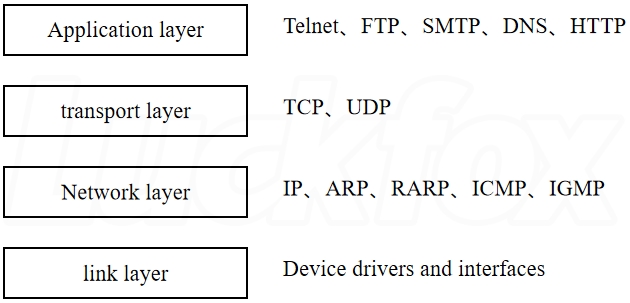
Application Layer: The top layer of the TCP/IP protocol stack, providing an interface between applications and the network. It includes various application protocols, such as HTTP, FTP, SMTP, etc. The application layer handles the communication requirements of specific applications and provides data exchange capabilities for applications.
Transport Layer: Responsible for end-to-end communication between hosts in the network. It uses TCP and UDP protocols to achieve reliable data transmission and flow control. Specific functions are as follows:
- TCP Protocol: Provides reliable, connection-oriented communication. It handles data segmentation, sequencing, retransmission mechanisms, and congestion control.
- UDP Protocol: Provides unreliable, connectionless communication. It is more lightweight and does not provide data reliability and sequencing, making it suitable for applications with high real-time requirements.
Network Layer: Responsible for packet transmission and routing selection between hosts in the network. It uses the IP protocol to implement packet forwarding and addressing. Specific functions are as follows:
- IP Protocol: Defines the format and transmission methods of data packets in the Internet. It uses IP addresses to identify hosts on the network and determines the transmission path of data packets through routing algorithms.
Link Layer: Responsible for data frame transmission in the physical network. It interacts directly with the network adapter (NIC) and handles physical layer details. Specific functions are as follows: Ethernet is the most commonly used link layer protocol, defining data frame formats, medium access control, and address resolution, among others.
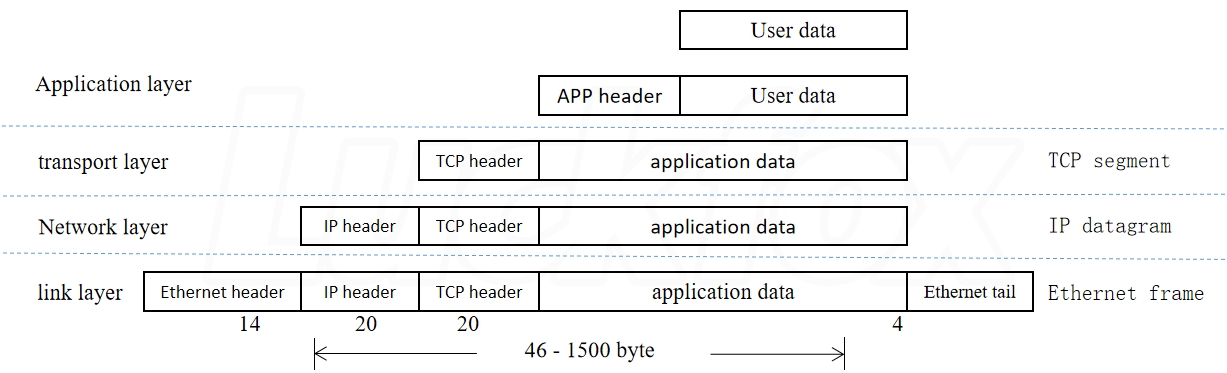
Different protocol layers have different names for data packets: at the transport layer, they are called TCP segments; at the network layer, they are called IP datagrams; and at the link layer, they are called Ethernet frames.
At the sender, starting from the transport layer, each layer adds a header to the data from the layer above to form the data for this layer; this process is called data encapsulation. At the receiver, starting from the lowest layer, each layer removes the header information from the data; this process is called data de-encapsulation.
7.2 Protocol Families and Address Families
A Protocol Family refers to a group of protocols, while an Address Family refers to the representation of network addresses. In computer network programming, some commonly used protocol families and address families are as follows:
7.2.1 Protocol Families
- IPv4 Protocol Family: Includes TCP, UDP, ICMP, and other protocols, using 32-bit IP addresses to identify hosts and routers in the network.
- IPv6 Protocol Family: Similar to IPv4 but using 128-bit IP addresses.
- Unix Domain Protocol Family: Used for inter-process communication on the same computer without data transmission over the network.
7.2.2 Address Families
- IPv4 Address Family: Represented using 32-bit binary numbers and usually displayed in dotted-decimal format, such as 192.168.0.1.
- IPv6 Address Family: Represented using 128-bit binary numbers and usually displayed in colon-separated hexadecimal format, such as 2001:0db8:85a3:0000:0000:8a2e:0370:7334.
- Unix Domain Address Family: Represented using file paths, such as /tmp/my_socket.
- In socket programming, it is often necessary to specify the protocol family and address family to create corresponding sockets. Common protocol family constants include AF_INET (IPv4 protocol family), AF_INET6 (IPv6 protocol family), AF_UNIX (Unix domain protocol family), etc.; common address family constants include PF_INET (IPv4 address family), PF_INET6 (IPv6 address family), PF_UNIX (Unix domain address family), etc.
7.3 Sockets
7.3.1 Basic Steps for TCP Socket Programming
The basic steps for TCP socket programming differ between client-side and server-side implementations. Below are the basic steps for each:
Client
- Create a socket: Use the
socketfunction to create a TCP socket. This function returns a file descriptor used for subsequent socket operations. - Connect to the server: Use the
connectfunction to connect to the server. This function requires specifying the server's IP address and port number. - Communicate: Use the socket for data sending and receiving. You can use the
sendandrecvfunctions for data sending and receiving, respectively. When sending data, specify the data's length and destination address; when receiving data, specify the buffer's length and source address. - Close the socket: Use the
closefunction to close the socket and release resources.
Server
- Create a socket: Use the
socketfunction to create a TCP socket. This function returns a file descriptor used for subsequent socket operations. - Bind the socket: Use the
bindfunction to bind the socket to a local IP address and port number. This step can be omitted if the local IP address and port number do not need to be specified. - Listen: Use the
listenfunction to set the socket to a listening state, waiting for client connection requests. Thelistenfunction specifies the maximum number of connection requests in the queue. - Accept connections: Use the
acceptfunction to wait for client connection requests. If there is a connection request, it accepts the connection and returns a new socket for communication with the client. - Communicate: Use the new socket for data sending and receiving. You can use the
sendandrecvfunctions for data sending and receiving, respectively. When sending data, specify the data's length and destination address; when receiving data, specify the buffer's length and source address. - Close the socket: Use the
closefunction to close the socket and release resources. - It is important to note that both the client and server must follow a certain communication protocol. Usually, a request-response protocol similar to HTTP is used, where the client sends requests to the server, the server processes the requests, and sends back the results to the client.