GPIO
1. GPIO 子系统简介
GPIO(General‑Purpose Input/Output,通用输入 / 输出)是一类可由处理器控制的可编程数字引脚,支持输出高低电平、检测外部输入电平。引脚经过复用配置后,也可以切换为串口、I2C、SPI 等外设功能。
在 Linux 系统中,内核提供了专门的 GPIO 子系统驱动框架,用于统一管理处理器的 GPIO 资源。基于该框架,开发者既可以在内核空间驱动中操作引脚,也能够将 GPIO 开放至用户空间进行控制。
用户空间可通过 sysfs 文件系统接口对 GPIO 引脚进行读写控制。GPIO 配置为输出时,可控制 LED、继电器等外设;配置为输入时,既可读取普通电平信号,也支持边沿中断检测,用于按键、外部传感器事件捕获等场景。依托 GPIO 子系统,引脚功能具备高度的灵活性与可编程性。
如需深入了解 Linux GPIO 子系统的实现原理,可参考内核源码文档:<Linux内核源码>/Documentation/driver-api/gpio/
2. GPIO 控制(Shell)
2.1 引脚分布
在将 GPIO 引脚导出到用户空间时,通常需要用到引脚编号,我们可以通过接口图进行确定。更多详细功能请参考《资料下载》 Datasheet 手册。

2.2 GPIO 编号计算
GPIO对应的引脚编号均在引脚图中标出,您可以直接使用或按照下面方法进行计算。
-
GPIO 有8个 bank:GPIO0~GPIO7,每个 bank 分为4组,每组 8 个引脚,一个 bank 一共 32 路 GPIO;
-
GPIO 的命名方式为
GPIO{bank}_{group}{X},如下所示:GPIO0_A0 ~ GPIO0_A7GPIO0_B0 ~ GPIO0_B7GPIO0_C0 ~ GPIO0_C7GPIO0_D0 ~ GPIO0_D7...GPIO7_A0 ~ GPIO7_D7 -
GPIO 全局线号计算公式如下:
line = bank * 32 + group * 8 + indexA = 0B = 1C = 2D = 3以
GPIO5_B4为例说明,其中:bank:5group:1(B 组)index:4
所以该引脚的的引脚编号为:
GPIO5_B4 = 5 * 32 + (1 * 8 + 4)= 172
2.3 使用 GPIO sysfs 接口
-
以
GPIO5_B4的引脚编号 172 为例,将 GPIO 控制从内核空间导出到用户空间:sudo suecho 172 > /sys/class/gpio/export -
导出成功后会生成
/sys/class/gpio/gpio172/:ls /sys/class/gpio/gpio172active_low device direction edge power subsystem uevent value -
取消GPIO 控制从内核空间到用户空间的导出:
echo 172 > /sys/class/gpio/unexport
2.4 设备目录和设备属性
- 向
/sys/class/gpio/export文件写入目标 GPIO 的全局编号,申请并导出 GPIO,不会强制释放已被其他驱动占用的引脚;占用时可能返回 Device or resource busy。导出成功后,系统生成对应的/sys/class/gpio/gpio<编号>控制目录,用户可通过目录内属性文件完成 GPIO 方向配置、电平读取与输出控制。root@aura:~# ls /sys/class/gpioexport gpio172 unexport - 引脚导出成功后会生成
/sys/class/gpio/gpio<N>设备目录,其中 N 为 GPIO 全局编号;目录内包含一组可读写的属性节点,用户空间可通过操作这些属性,实现 GPIO 引脚的配置与电平控制。root@aura:~# ls /sys/class/gpio/gpio172/active_low device direction edgepower subsystem uevent value- direction:GPIO 方向控制节点。写入
in将引脚配置为输入模式;写入out将引脚配置为输出模式。 - value:GPIO 电平节点。输入模式时读取该文件可获取引脚实时电平;输出模式时写入
1或0,控制引脚输出高低电平。电平逻辑受active_low属性影响。 - edge:边沿检测配置节点,仅输入模式有效。设置边沿触发条件后,用户程序可通过
poll()、select()监听引脚电平变化;仅配置 edge 属性并不会产生硬件中断回调。rising:上升沿触发falling:下降沿触发both:双边沿触发none:禁用边沿检测
- direction:GPIO 方向控制节点。写入
2.5 控制输出电平
- 设置方向:
cd /sys/class/gpio/gpio172echo out > direction # 设置 GPIO 为输出echo in > direction # 设置 GPIO 为输入
- 设置value属性来控制 GPIO 电平:
cat valueecho 0 > valueecho 1 > value
2.6 读取输入电平
cd /sys/class/gpio/gpio172

echo in > direction
cat value
3. 控制 GPIO(Python 程序)
-
示例程序:
from periphery import GPIOimport timeOUT_PIN = 172IN_PIN = 171out_gpio = GPIO(OUT_PIN, "out")in_gpio = GPIO(IN_PIN, "in")try:while True:out_gpio.write(True)read_back = in_gpio.read()print(f"HIGH, hardware readback = {read_back}")time.sleep(0.5)out_gpio.write(False)read_back = in_gpio.read()print(f"LOW, hardware readback = {read_back}")time.sleep(0.5)except KeyboardInterrupt:print("\nUser stop test.")finally:out_gpio.write(False)out_gpio.close()in_gpio.close() -
打开并配置 GPIO:
OUT_PIN = 172IN_PIN = 171out_gpio = GPIO(OUT_PIN, "out")in_gpio = GPIO(IN_PIN, "in")通过
periphery.GPIO打开 GPIO172 和 GPIO171,分别配置为输出和输入。 -
控制输出并读取输入:
out_gpio.write(True)read_back = in_gpio.read()print(f"HIGH, hardware readback = {read_back}")time.sleep(0.5)out_gpio.write(False)read_back = in_gpio.read()print(f"LOW, hardware readback = {read_back}")time.sleep(0.5)循环切换 GPIO172 的输出电平,每次切换后读取 GPIO171,并等待 0.5 秒。正确短接后,高电平应读到
True,低电平应读到False。 -
结束测试并释放资源:
except KeyboardInterrupt:print("\nUser stop test.")finally:out_gpio.write(False)out_gpio.close()in_gpio.close()按 Ctrl+C 结束循环。退出前将 GPIO172 拉低,再关闭两个 GPIO 对象,释放资源。
-
运行程序:
python3 GPIO.py执行结果:

4. 控制 GPIO(C 程序)
-
完整代码:
#include <errno.h>#include <stdio.h>#include <stdlib.h>#include <string.h>#include <unistd.h>#include <signal.h>#define OUT_LINE 172#define IN_LINE 171static volatile int g_exit_flag = 0;static void sigint_handler(int sig){(void)sig;g_exit_flag = 1;printf("\nReceive Ctrl+C, preparing exit...\n");}static int write_text(const char *path, const char *text){FILE *file = fopen(path, "w");if (file == NULL) {fprintf(stderr, "open %s failed: %s\n", path, strerror(errno));return -1;}if (fprintf(file, "%s", text) < 0) {fprintf(stderr, "write %s failed: %s\n", path, strerror(errno));fclose(file);return -1;}fclose(file);return 0;}static int read_text(const char *path, char *buf, size_t buf_len){FILE *file = fopen(path, "r");if (file == NULL) {fprintf(stderr, "open %s failed: %s\n", path, strerror(errno));return -1;}if (fgets(buf, (int)buf_len, file) == NULL) {fclose(file);return -1;}fclose(file);return 0;}static void gpio_unexport(int line){char tmp[16];snprintf(tmp, sizeof(tmp), "%d", line);write_text("/sys/class/gpio/unexport", tmp);}int main(void){char out_text[16], in_text[16];char out_dir_path[64], out_val_path[64];char in_dir_path[64], in_val_path[64];char read_buf[8];int out_owned = 0, in_owned = 0;signal(SIGINT, sigint_handler);snprintf(out_text, sizeof(out_text), "%d", OUT_LINE);snprintf(in_text, sizeof(in_text), "%d", IN_LINE);snprintf(out_dir_path, sizeof(out_dir_path), "/sys/class/gpio/gpio%d/direction", OUT_LINE);snprintf(out_val_path, sizeof(out_val_path), "/sys/class/gpio/gpio%d/value", OUT_LINE);snprintf(in_dir_path, sizeof(in_dir_path), "/sys/class/gpio/gpio%d/direction", IN_LINE);snprintf(in_val_path, sizeof(in_val_path), "/sys/class/gpio/gpio%d/value", IN_LINE);if (write_text("/sys/class/gpio/export", out_text) < 0) {if (errno != EBUSY) {fprintf(stderr, "export out gpio %d failed\n", OUT_LINE);return EXIT_FAILURE;}fprintf(stderr, "gpio %d already exported, reusing\n", OUT_LINE);} else {out_owned = 1;}if (write_text("/sys/class/gpio/export", in_text) < 0) {if (errno != EBUSY) {if (out_owned) gpio_unexport(OUT_LINE);fprintf(stderr, "export in gpio %d failed\n", IN_LINE);return EXIT_FAILURE;}fprintf(stderr, "gpio %d already exported, reusing\n", IN_LINE);} else {in_owned = 1;}usleep(100000);if (write_text(out_dir_path, "out") < 0) goto cleanup;if (write_text(in_dir_path, "in") < 0) goto cleanup;printf("Loop‑back test start: OUT=%d, IN=%d\n", OUT_LINE, IN_LINE);printf("Hardware: short OUT_PIN and IN_PIN together!\n");while (!g_exit_flag){if (write_text(out_val_path, "1") < 0) goto cleanup;usleep(50000);if(read_text(in_val_path, read_buf, sizeof(read_buf)) == 0){printf("HIGH, hardware readback = %s", read_buf);}usleep(500000);if(g_exit_flag) break;if (write_text(out_val_path, "0") < 0) goto cleanup;usleep(50000);if(read_text(in_val_path, read_buf, sizeof(read_buf)) == 0){printf("LOW, hardware readback = %s", read_buf);}usleep(500000);}cleanup:printf("\nCleaning GPIO resources ...\n");write_text(out_val_path, "0");if (out_owned) gpio_unexport(OUT_LINE);if (in_owned) gpio_unexport(IN_LINE);if(g_exit_flag)return EXIT_SUCCESS;elsereturn EXIT_FAILURE;} -
导出引脚到用户空间:通过
write_text()将输出、输入引脚的编号分别写入/sys/class/gpio/export,导出两个 GPIO。snprintf(out_text, sizeof(out_text), "%d", OUT_LINE);snprintf(in_text, sizeof(in_text), "%d", IN_LINE);if (write_text("/sys/class/gpio/export", out_text) < 0) {if (errno != EBUSY) {fprintf(stderr, "export out gpio %d failed\n", OUT_LINE);return EXIT_FAILURE;}fprintf(stderr, "gpio %d already exported, reusing\n", OUT_LINE);} else {out_owned = 1;}if (write_text("/sys/class/gpio/export", in_text) < 0) {if (errno != EBUSY) {if (out_owned) gpio_unexport(OUT_LINE);fprintf(stderr, "export in gpio %d failed\n", IN_LINE);return EXIT_FAILURE;}fprintf(stderr, "gpio %d already exported, reusing\n", IN_LINE);} else {in_owned = 1;}usleep(100000);OUT_LINE = 172对应输出引脚GPIO5_B4,IN_LINE = 171对应输入引脚GPIO5_B3。导出后生成gpio172和gpio171控制目录。out_owned和in_owned标志位记录各 GPIO 是否由本程序导出。当其他程序已导出该 GPIO(EBUSY)时,代码复用已有节点但不标记所有权。等待 100 毫秒后继续配置。 -
配置 GPIO 方向:分别向两个 GPIO 的
direction属性写入out和in,设置输出与输入方向。snprintf(out_dir_path, sizeof(out_dir_path), "/sys/class/gpio/gpio%d/direction", OUT_LINE);snprintf(in_dir_path, sizeof(in_dir_path), "/sys/class/gpio/gpio%d/direction", IN_LINE);if (write_text(out_dir_path, "out") < 0) goto cleanup;if (write_text(in_dir_path, "in") < 0) goto cleanup;GPIO172 用于输出测试电平,GPIO171 用于读取短接线传来的电平。配置失败时跳转到
cleanup清理资源。 -
控制输出电平并读取输入:向 GPIO172 的
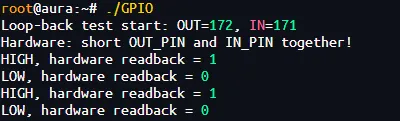
value写入1或0,再通过read_text()读取 GPIO171 的value,验证实际输入电平。while (!g_exit_flag){if (write_text(out_val_path, "1") < 0) goto cleanup;usleep(50000);if (read_text(in_val_path, read_buf, sizeof(read_buf)) == 0){printf("HIGH, hardware readback = %s", read_buf);}usleep(500000);if (g_exit_flag) break;if (write_text(out_val_path, "0") < 0) goto cleanup;usleep(50000);if (read_text(in_val_path, read_buf, sizeof(read_buf)) == 0){printf("LOW, hardware readback = %s", read_buf);}usleep(500000);}每次切换输出后先等待 50 毫秒,再读取输入并等待 500 毫秒。正确短接后,高电平应读到
1,低电平应读到0。 -
取消导出引脚: 在
cleanup中先将输出引脚拉低,再只取消本程序拥有所有权的引脚的导出。write_text(out_val_path, "0");if (out_owned) gpio_unexport(OUT_LINE);if (in_owned) gpio_unexport(IN_LINE);gpio_unexport()将 GPIO 编号写入/sys/class/gpio/unexport。仅取消本程序成功导出的 GPIO,避免影响其他程序控制的 GPIO。 -
交叉编译:使用 AArch64 工具链。
export PATH=<Luckfox_Aura_SDK>/tools/linux/toolchain/aarch64-rockchip1240-linux-gnu/bin:$PATH编译程序:
aarch64-rockchip1240-linux-gnu-gcc GPIO.c -o GPIO -
传输并运行:可通过 SCP 或 ADB 将程序传输到 Aura。
scp GPIO root@<Aura_IP>:/root/或:
adb push GPIO /root/在开发板上运行:
chmod +x /root/GPIO/root/GPIO