系统配置
1. 语言设置
-
使用 Vim 编辑
/etc/locale.gen文件,将不需要的语言环境注释掉并启用所需的语言环境。vim /etc/locale.gen -
中文切换成英文,在文件中执行以下操作。
注释掉 zh_CN.UTF-8 UTF-8 这一行。取消注释 en_US.UTF-8 UTF-8 这一行。 -
使用
dpkg-reconfigure命令以非交互方式重新生成语言环境文件:dpkg-reconfigure -f noninteractive locales
2. 自启动配置
本小节以自启以 GPIO 程序为例,该程序绝对路径是 /home/luckfox/gpio.py,请结合自己实际文件和路径修改对应位置。
2.1 桌面自启动
-
首先我们使用如下命令新建一个 startup.sh:(Omni3566 默认在 /home/luckfox)
sudo touch startup.sh -
打开
startup.sh脚本文件,填入如下内容:#!/bin/shsudo python3 gpio.py -
赋予
startup.sh脚本文件权限:sudo chmod 777 startup.sh -
新建自启文件:
cd .config && mkdir autostartcd autostart && sudo nano start.desktop -
填入如下内容:
[Desktop Entry]Type=ApplicationExec=/home/luckfox/startup.sh -
重启:
sudo reboot
2.2 在rc.local脚本中添加自启动
-
打开
/etc/rc.local脚本在 exit 0 前面增加一行:sudo python3 /home/luckfox/gpio.py & -
重启 Core3566:
sudo reboot
2.3 系统管理器设置自启动
-
在
/etc/systemd/system/gpio.service新建一个自启服务对应的配置文件,填入如下内容:[Unit]Description=start oled[Service]Type=simpleRestart=alwaysRestartSec=5ExecStart=/home/luckfox/gpio.py[Install]WantedBy=multi-user.target -
启用一个服务,使它在系统启动时自动启动:
sudo systemctl enable gpio.service -
重启:
sudo systemctl restart gpio.service -
重启 Omni3576:
sudo reboot -
如果想要禁用一个服务,使它在系统启动时不会自动启动:
sudo systemctl disable gpio.service
3. 中文输入法安装
-
安装桌面终端软件。
sudo apt updatesudo apt install xfce4-terminal -
安装 IBUS 输入法及相关组件。
sudo apt updatesudo apt install ibus-gtk ibus-gtk3 ibus ibus-libpinyin ibus-wayland at-spi2-core -
启动 IBUS 输入法后台服务。
ibus-daemon -drx -
配置中文输入法。
ibus-setup- 在弹出的设置窗口中:
- 进入 Input Method -> Add
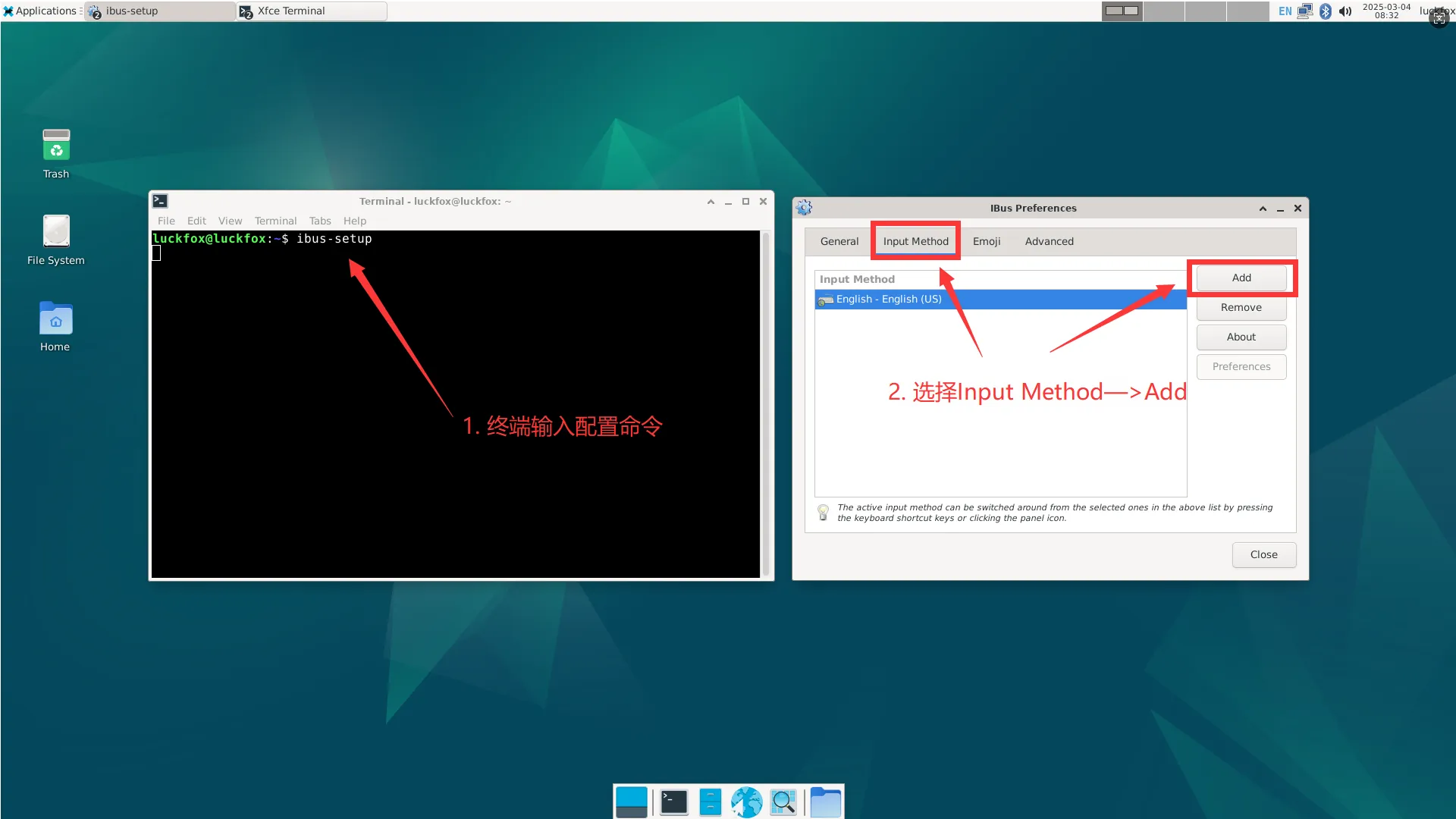
- 选择 Chinese -> Intelligent Pinyin
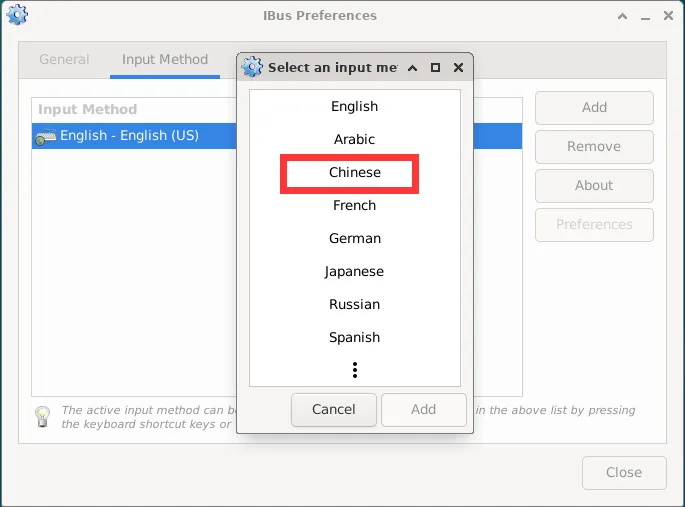
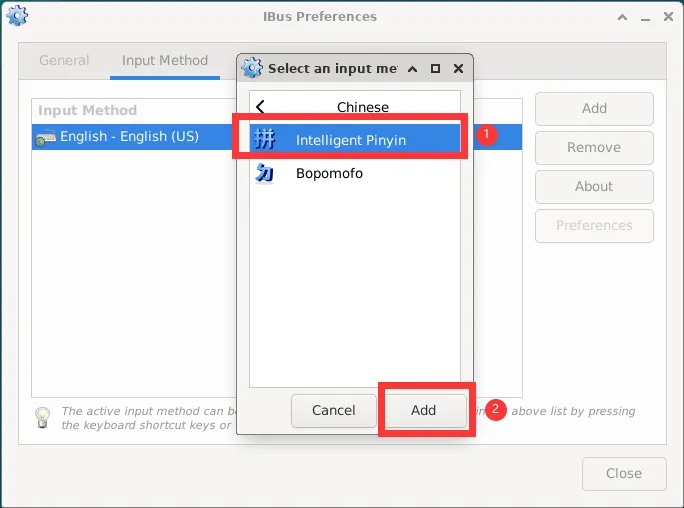
- 点击 Close 退出
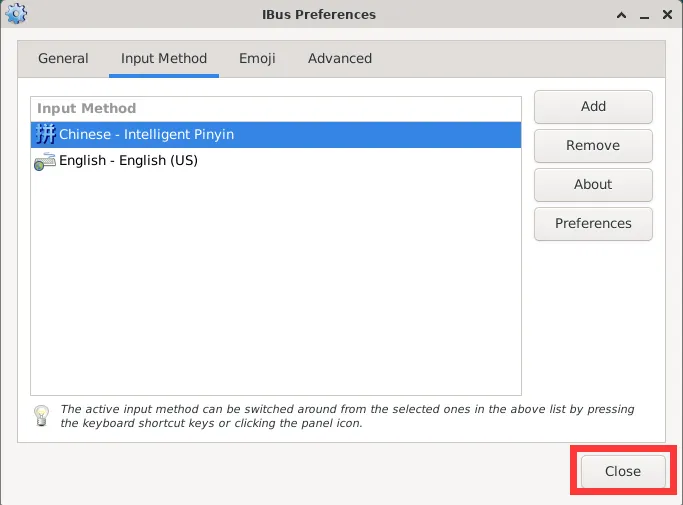
- 进入 Input Method -> Add
- 在弹出的设置窗口中:
-
重启开发板
reboot- 然后左键单击右上角键盘图标,选择 中文(Chinese)。

- 然后左键单击右上角键盘图标,选择 中文(Chinese)。
-
安装
im-config配置工具,并设置 IBUS 为默认输入法框架sudo apt install im-configim-config -n ibus