蓝牙
1. 简介
Luckfox Omni3576 上搭载了 AIC8800D80 模块,支持 2.4GHz/5GHz Wi‐Fi6 和 BT 5.2/BLE 蓝牙。
2. 桌面系统配置蓝牙
-
点击桌面右上角的蓝牙图图标。
-
点击
search搜索蓝牙设备。 -
选择想要连接设备,点击配对。
-
点击
√信任设备。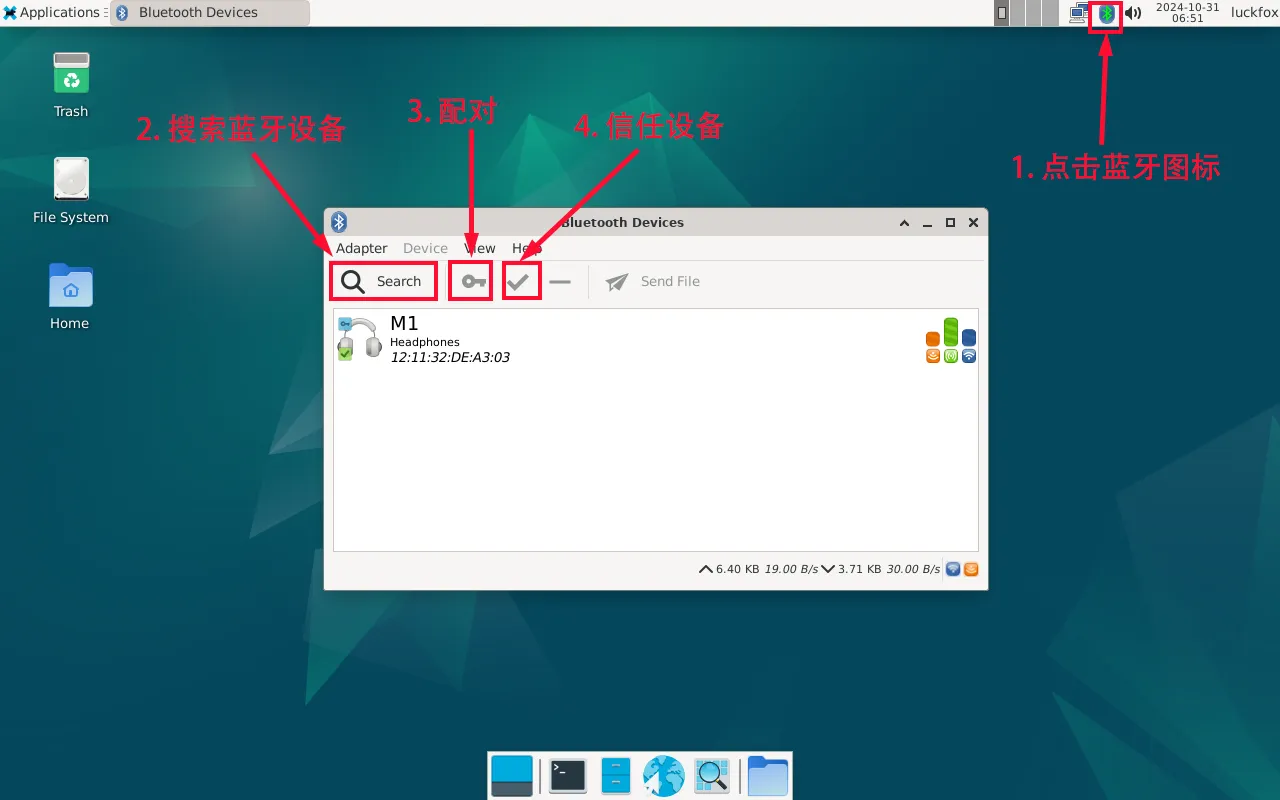
-
右键点击已信任的设备,选择“连接”,此时右上角的蓝牙图标会变为绿色,表示连接成功。
3. 终端连接蓝牙
在终端和蓝牙通信需要使用 bluetoothctl 工具。
-
常规连接。
root@luckfox:/home/luckfox# bluetoothctl[bluetooth]# default-agent[bluetooth]# power on #打开蓝牙[bluetooth]# scan on #扫描蓝牙设备[bluetooth]# trust 12:11:32:DE:A3:03 #信任蓝牙设备号[bluetooth]# pair 12:11:32:DE:A3:03[bluetooth]# connect 12:11:32:DE:A3:03 #连接蓝牙[M1]# exit -
用安卓手机连接开发板蓝牙。
bluetoothctl #打开bluez蓝牙工具power on #启动蓝牙设备pairable on #设置为配对模式discoverable on #设置为可发现模式agent on #启动代理default-agent #设置当前代理为默认discoverable on #开启发现模式- 手机会提示与开发板进行蓝牙配对,此时需点击“配对”。然后在终端窗口输入
yes,完成与手机的配对。
root@luckfox:/# bluetoothctlAgent registered[bluetooth]# power onChanging power on succeeded[bluetooth]# pairable onChanging pairable on succeeded[bluetooth]# discoverable onChanging discoverable on succeeded[CHG] Controller 44:37:0B:72:30:08 Discoverable: yes[bluetooth]# agent onAgent is already registered[bluetooth]# default-agentDefault agent request successful[NEW] Device BC:6A:D1:44:B7:87 2805047123的Redmi Note 9 ProRequest confirmation[agent] Confirm passkey 506154 (yes/no): yes[CHG] Device BC:6A:D1:44:B7:87 Bonded: yes......[CHG] Device BC:6A:D1:44:B7:87 ServicesResolved: yes[CHG] Device BC:6A:D1:44:B7:87 Paired: yesAuthorize service[agent] Authorize service 0000111e-0000-1000-8000-00805f9b34fb (yes/no): yesAuthorize service[agent] Authorize service 0000110d-0000-1000-8000-00805f9b34fb (yes/no): yes[CHG] Device BC:6A:D1:44:B7:87 UUIDs: 00001105-0000-1000-8000-00805f9b34fb......[2805047123的Redmi Note 9 Pro]# - 手机会提示与开发板进行蓝牙配对,此时需点击“配对”。然后在终端窗口输入