RKNN Model Zoo 示例运行
1. rknn_model_zoo 应用示例验证流程
rknn_model_zoo 是瑞芯微官方提供的 RKNPU 支持的各种主流算法的部署示例,最新的示例支持 mobilenet 模型部署和 yolo 模型部署,本章以部署 yolov10 为例介绍 rknn_model_zoo 示例的使用。
本流程展示了从 ONNX 模型转换到开发板推理的完整过程,涵盖模型转换、部署及运行等关键步骤。板端提供两种推理方式:可通过 C 程序实现高性能推理,或使用 Python(RKNN-Toolkit-Lite2)进行快速开发与验证。
2. 在 RKNN-Toolkit2 环境中完成 ONNX 转 RKNN 模型
-
下载 rknn_model_zoo
git clone https://github.com/airockchip/rknn_model_zoo.git -
获取 Yolov10 ONNX 模型文件。
cd <rknn_model_zoo Path>/rknn_model_zoo/examples/yolov10/modelchmod a+x download_model.sh./download_model.sh -
执行
rknn_model_zoo/examples/yolov10/python目录下的模型转换程序convert.py,使用方法:conda activate RKNN-Toolkit2cd <rknn_model_zoo Path>/rknn_model_zoo/examples/yolov10/pythonpython3 convert.py ../model/yolov10n.onnx rv1126b# output model will be saved as ../model/yolov10.rknnpython3 convert.py <onnx_model> <TARGET_PLATFORM> <dtype(optional)> <output_rknn_path(optional)>参数介绍:
<onnx_model>:ONNX 模型路径<TARGET_PLATFORM>:指定 NPU 平台名,这里指rv1126b<quant_dtype>:可选项,可以指定为i8或fp。i8表示进行量化,fp表示不量化,默认为i8<output_rknn_path>:可选项,用于指定 RKNN 模型的保存路径,默认保存在 ONNX 模型同一目录下,名称为yolov10n.rknn
3. 模型推理(C)
3.1 在 x86_64 Linux 平台交叉编译 C 推理程序
-
成功将 ONNX 模型转换成 RKNN 模型后,现在对
rknn_model_zoo/examples/yolov10目录下的例程进行交叉编译,编译例程前需要设置如下环境变量:export GCC_COMPILER=/home/luckfox/Luckfox/rv1126b/sdk-251224/tools/linux/toolchain/aarch64-rockchip1240-linux-gnu/bin/aarch64-rockchip1240-linux-gnu -
执行 rknn_model_zoo 目录下的 build-linux.sh 脚本。该脚本将编译例程:
chmod +x ./build-linux.sh./build-linux.sh -t rv1126b -a aarch64 -d yolov10- 编译过程:
(RKNN-Toolkit2) luckfox@xt:~/conda/rknn_model_zoo$ ./build-linux.sh -t rv1126b -a aarch64 -d yolov10./build-linux.sh -t rv1126b -a aarch64 -d yolov10/home/luckfox/Luckfox/rv1126b/sdk-251224/tools/linux/toolchain/aarch64-rockchip1240-linux-gnu/bin/aarch64-rockchip1240-linux-gnu===================================BUILD_DEMO_NAME=yolov10BUILD_DEMO_PATH=examples/yolov10/cppTARGET_SOC=rv1126bTARGET_ARCH=aarch64BUILD_TYPE=ReleaseENABLE_ASAN=OFFDISABLE_RGA=OFFDISABLE_LIBJPEG=OFFINSTALL_DIR=/home/luckfox/conda/rknn_model_zoo/install/rv1126b_linux_aarch64/rknn_yolov10_demoBUILD_DIR=/home/luckfox/conda/rknn_model_zoo/build/build_rknn_yolov10_demo_rv1126b_linux_aarch64_ReleaseCC=/home/luckfox/Luckfox/rv1126b/sdk-251224/tools/linux/toolchain/aarch64-rockchip1240-linux-gnu/bin/aarch64-rockchip1240-linux-gnu-gccCXX=/home/luckfox/Luckfox/rv1126b/sdk-251224/tools/linux/toolchain/aarch64-rockchip1240-linux-gnu/bin/aarch64-rockchip1240-linux-gnu-g++===================================-- The C compiler identification is GNU 12.4.0-- The CXX compiler identification is GNU 12.4.0-- Detecting C compiler ABI info-- Detecting C compiler ABI info - done-- Check for working C compiler: /home/luckfox/Luckfox/rv1126b/sdk-251224/tools/linux/toolchain/aarch64-rockchip1240-linux-gnu/bin/aarch64-rockchip1240-linux-gnu-gcc - skipped-- Detecting C compile features-- Detecting C compile features - done-- Detecting CXX compiler ABI info-- Detecting CXX compiler ABI info - done-- Check for working CXX compiler: /home/luckfox/Luckfox/rv1126b/sdk-251224/tools/linux/toolchain/aarch64-rockchip1240-linux-gnu/bin/aarch64-rockchip1240-linux-gnu-g++ - skipped-- Detecting CXX compile features-- Detecting CXX compile features - done-- !!!!!!!!!!!CMAKE_SYSTEM_NAME: Linux-- Looking for pthread.h-- Looking for pthread.h - found-- Performing Test CMAKE_HAVE_LIBC_PTHREAD-- Performing Test CMAKE_HAVE_LIBC_PTHREAD - Success-- Found Threads: TRUE-- Configuring done-- Generating done-- Build files have been written to: /home/luckfox/conda/rknn_model_zoo/build/build_rknn_yolov10_demo_rv1126b_linux_aarch64_Release[ 16%] Building C object utils.out/CMakeFiles/imageutils.dir/image_utils.c.o[ 16%] Building C object utils.out/CMakeFiles/imagedrawing.dir/image_drawing.c.o[ 25%] Building C object utils.out/CMakeFiles/audioutils.dir/audio_utils.c.o[ 33%] Building C object utils.out/CMakeFiles/fileutils.dir/file_utils.c.o[ 41%] Linking C static library libfileutils.a.........[100%] Linking CXX executable rknn_yolov10_demo[100%] Built target rknn_yolov10_demoConsolidate compiler generated dependencies of target imagedrawing[ 16%] Built target imagedrawingConsolidate compiler generated dependencies of target imageutils[ 33%] Built target imageutilsConsolidate compiler generated dependencies of target fileutils[ 50%] Built target fileutilsConsolidate compiler generated dependencies of target rknn_yolov10_demo[ 83%] Built target rknn_yolov10_demoConsolidate compiler generated dependencies of target audioutils[100%] Built target audioutilsInstall the project...-- Install configuration: "Release"-- Installing: /home/luckfox/conda/rknn_model_zoo/install/rv1126b_linux_aarch64/rknn_yolov10_demo/./rknn_yolov10_demo-- Set runtime path of "/home/luckfox/conda/rknn_model_zoo/install/rv1126b_linux_aarch64/rknn_yolov10_demo/./rknn_yolov10_demo" to "$ORIGIN/../lib"-- Installing: /home/luckfox/conda/rknn_model_zoo/install/rv1126b_linux_aarch64/rknn_yolov10_demo/model/bus.jpg-- Installing: /home/luckfox/conda/rknn_model_zoo/install/rv1126b_linux_aarch64/rknn_yolov10_demo/model/coco_80_labels_list.txt-- Installing: /home/luckfox/conda/rknn_model_zoo/install/rv1126b_linux_aarch64/rknn_yolov10_demo/model/yolov10.rknn-- Installing: /home/luckfox/conda/rknn_model_zoo/install/rv1126b_linux_aarch64/rknn_yolov10_demo/lib/librknnrt.so-- Installing: /home/luckfox/conda/rknn_model_zoo/install/rv1126b_linux_aarch64/rknn_yolov10_demo/lib/librga.so
- 编译过程:
-
交叉编译完成后在 rknn_model_zoo 目录下会生成一个 install 目录,包含编译出来的程序和库文件。
(RKNN-Toolkit2) ubuntu@ubuntu:~/conda/rknn_model_zoo/install/rv1126b_linux_aarch64/rknn_yolov10_demo$ lslib model rknn_yolov10_demo
3.2 将 install 目录整体部署至Luckfox Aura 板端进行推理
-
先将整个
rknn_yolov10_demo目录传输至开发板,然后执行下面指令运行程序:scp -r rv1126b_linux_aarch64/rknn_yolov10_demo/ luckfox@192.168.253.105:/home/aura./rknn_yolov10_demo ./model/yolov10.rknn ./model/bus.jpg -
推理完成后生成图片
out.png(base) root@aura:/home/aura/rv1126b_linux_aarch64/rknn_yolov10_demo# ./rknn_yolov10_demo ./model/yolov10.rknn ./model/bus.jpgload lable ./model/coco_80_labels_list.txtmodel input num: 1, output num: 6input tensors:index=0, name=images, n_dims=4, dims=[1, 640, 640, 3], n_elems=1228800, size=1228800, fmt=NHWC, type=INT8, qnt_type=AFFINE, zp=-128, scale=0.003922output tensors:index=0, name=470, n_dims=4, dims=[1, 64, 80, 80], n_elems=409600, size=409600, fmt=NCHW, type=INT8, qnt_type=AFFINE, zp=-38, scale=0.114574index=1, name=484, n_dims=4, dims=[1, 80, 80, 80], n_elems=512000, size=512000, fmt=NCHW, type=INT8, qnt_type=AFFINE, zp=-128, scale=0.002001index=2, name=491, n_dims=4, dims=[1, 64, 40, 40], n_elems=102400, size=102400, fmt=NCHW, type=INT8, qnt_type=AFFINE, zp=-57, scale=0.095044index=3, name=505, n_dims=4, dims=[1, 80, 40, 40], n_elems=128000, size=128000, fmt=NCHW, type=INT8, qnt_type=AFFINE, zp=-128, scale=0.003505index=4, name=512, n_dims=4, dims=[1, 64, 20, 20], n_elems=25600, size=25600, fmt=NCHW, type=INT8, qnt_type=AFFINE, zp=-58, scale=0.061253index=5, name=526, n_dims=4, dims=[1, 80, 20, 20], n_elems=32000, size=32000, fmt=NCHW, type=INT8, qnt_type=AFFINE, zp=-128, scale=0.003792model is NHWC input fmtmodel input height=640, width=640, channel=3origin size=640x640 crop size=640x640input image: 640 x 640, subsampling: 4:2:0, colorspace: YCbCr, orientation: 1scale=1.000000 dst_box=(0 0 639 639) allow_slight_change=1 _left_offset=0 _top_offset=0 padding_w=0 padding_h=0rga_api version 1.10.1_[0]184 im2d_rga_impl rga_get_info(718): Can not get the correct RGA version, please check the driver, version=4.1.34669184 im2d_rga_impl rga_check(1280): rga im2d: rga2 get info failed!Error on improcess STATUS=0RGA error message: Fatal error: rga im2d: rga2 get info failed!try convert image use cpufinishrknn_runbus @ (88 137 556 437) 0.937person @ (109 234 226 536) 0.906person @ (210 240 284 511) 0.899person @ (478 233 560 519) 0.800person @ (79 331 114 518) 0.351write_image path: out.png width=640 height=640 channel=3 data=0x7f864a7010(base) root@aura:/home/aura/rv1126b_linux_aarch64/rknn_yolov10_demo# lslib model out.png rknn_yolov10_demo- 推理结果:
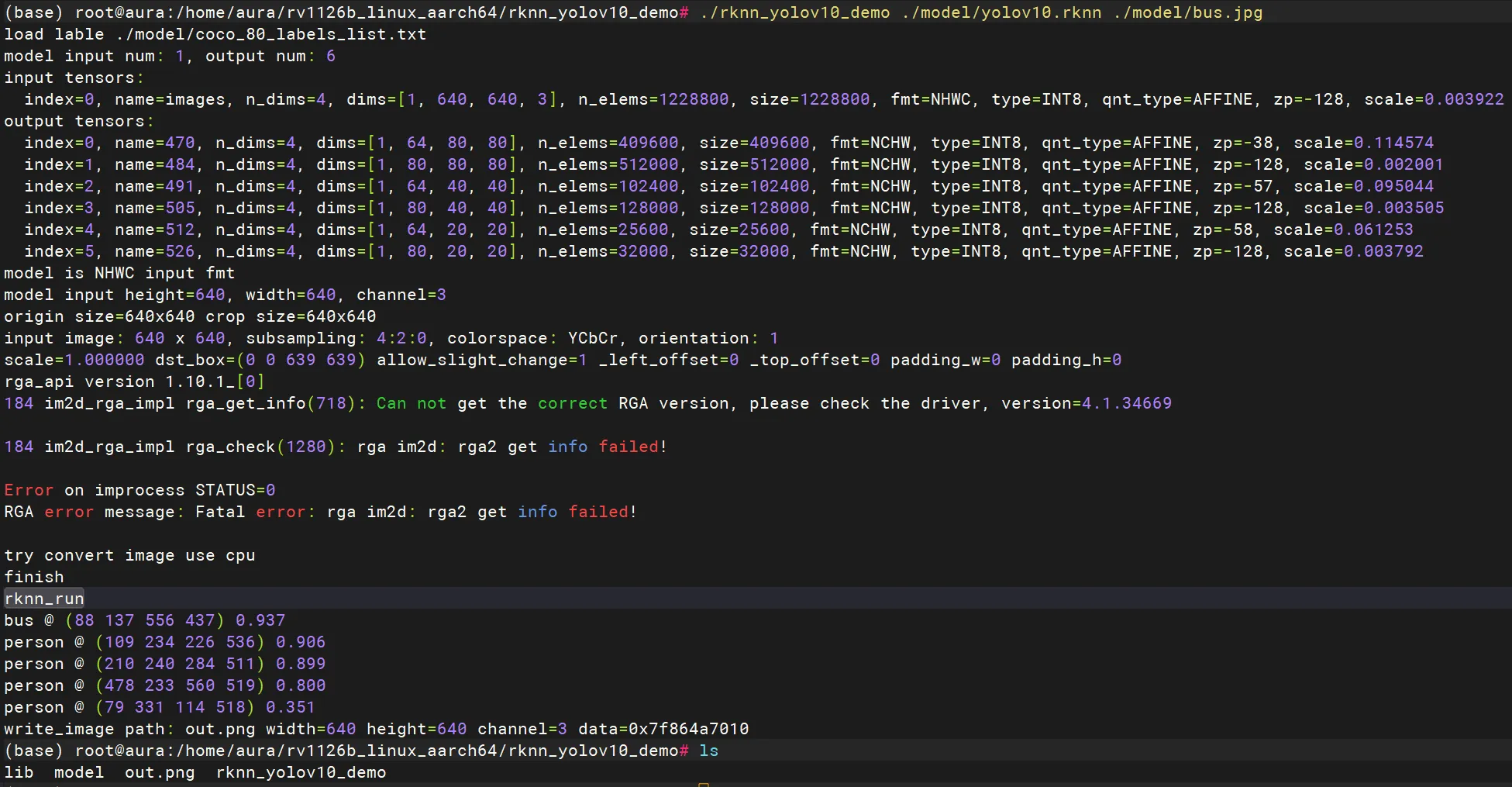
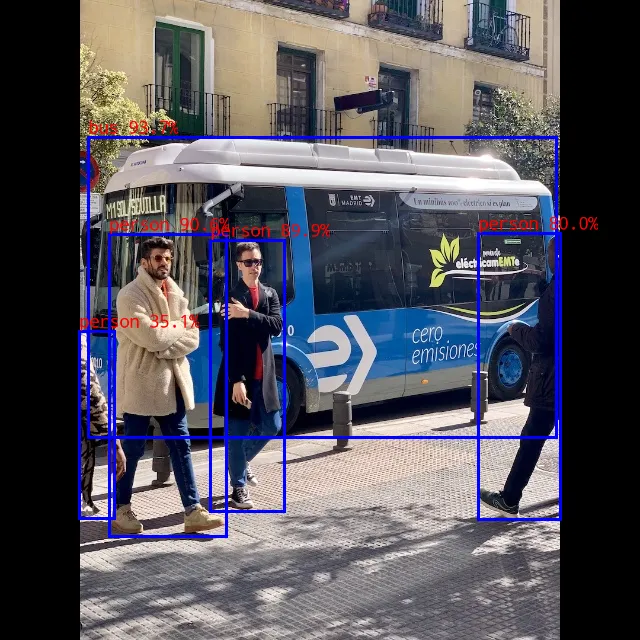
- 推理结果:
4. 模型推理(Python)
- 将 rknn_model_zoo/examples/yolov10 目录拷贝至开发板,并进入 model 目录,编写基于 RKNN-Toolkit-Lite2 的 Python 推理程序。
import numpy as npimport cv2from rknnlite.api import RKNNLite# ---------------- 配置 ----------------MODEL_PATH = 'yolov10.rknn'IMG_PATH = 'bus.jpg'IMG_SIZE = 640OBJ_THRESH = 0.65NMS_THRESH = 0.35CLASSES = ['person', 'bicycle', 'car', 'motorcycle', 'airplane', 'bus', 'train', 'truck', 'boat', 'traffic light','fire hydrant', 'stop sign', 'parking meter', 'bench', 'bird', 'cat', 'dog', 'horse', 'sheep', 'cow','elephant', 'bear', 'zebra', 'giraffe', 'backpack', 'umbrella', 'handbag', 'tie', 'suitcase', 'frisbee','skis', 'snowboard', 'sports ball', 'kite', 'baseball bat', 'baseball glove', 'skateboard', 'surfboard','tennis racket', 'bottle', 'wine glass', 'cup', 'fork', 'knife', 'spoon', 'bowl', 'banana', 'apple','sandwich', 'orange', 'broccoli', 'carrot', 'hot dog', 'pizza', 'donut', 'cake', 'chair', 'couch','potted plant', 'bed', 'dining table', 'toilet', 'tv', 'laptop', 'mouse', 'remote', 'keyboard', 'cell phone','microwave', 'oven', 'toaster', 'sink', 'refrigerator', 'book', 'clock', 'vase', 'scissors', 'teddy bear','hair drier', 'toothbrush']def sigmoid(x):return 1 / (1 + np.exp(-np.clip(x, -20, 20)))def softmax(x, axis=1):x_exp = np.exp(x - np.max(x, axis=axis, keepdims=True))return x_exp / np.sum(x_exp, axis=axis, keepdims=True)def main():rknn = RKNNLite()# --- 加载日志 ---print(f"load rknn model: {MODEL_PATH}")if rknn.load_rknn(MODEL_PATH) != 0:print("load rknn failed!"); returnif rknn.init_runtime() != 0:print("init runtime failed!"); return# --- 模拟打印 Tensor 信息 ---try:input_attrs = rknn.get_sdk_get_inputs_attrs()output_attrs = rknn.get_sdk_get_outputs_attrs()print(f"model input num: {len(input_attrs)}, output num: {len(output_attrs)}")print("input tensors:")for i, a in enumerate(input_attrs):print(f" index={i}, name={a['name']}, dims={a['dims']}, zp={a['zp']}, scale={a['scale']:.6f}")print("output tensors:")for i, a in enumerate(output_attrs):print(f" index={i}, name={a['name']}, dims={a['dims']}, zp={a['zp']}, scale={a['scale']:.6f}")except:passimg_src = cv2.imread(IMG_PATH)h_ori, w_ori = img_src.shape[:2]print(f"input image: {w_ori} x {h_ori}")img = cv2.resize(img_src, (IMG_SIZE, IMG_SIZE))img = cv2.cvtColor(img, cv2.COLOR_BGR2RGB)print("rknn_run")outputs = rknn.inference(inputs=[np.expand_dims(img, 0)])reg_layers = [o for o in outputs if o.shape[1] == 64]cls_layers = [o for o in outputs if o.shape[1] == 80]reg_layers.sort(key=lambda x: x.shape[2], reverse=True)cls_layers.sort(key=lambda x: x.shape[2], reverse=True)strides = [8, 16, 32]boxes_all, scores_all, ids_all = [], [], []for i in range(len(reg_layers)):reg = reg_layers[i].astype(np.float32)cls = cls_layers[i].astype(np.float32)stride = strides[i]scores = sigmoid(cls)b, c, h, w = reg.shapereg_dist = reg.reshape(1, 4, 16, h, w)reg_dist = softmax(reg_dist, axis=2)dist = (reg_dist * np.arange(16).reshape(1, 1, 16, 1, 1)).sum(2)grid_y, grid_x = np.indices((h, w))grid = np.stack([grid_x, grid_y], axis=0).astype(np.float32)x1 = (grid[0:1] + 0.5 - dist[:, 0:1]) * stridey1 = (grid[1:2] + 0.5 - dist[:, 1:2]) * stridex2 = (grid[0:1] + 0.5 + dist[:, 2:3]) * stridey2 = (grid[1:2] + 0.5 + dist[:, 3:4]) * stridebox = np.concatenate([x1, y1, x2, y2], axis=1).transpose(0, 2, 3, 1).reshape(-1, 4)prob = scores.transpose(0, 2, 3, 1).reshape(-1, 80)max_s = np.max(prob, axis=1)max_id = np.argmax(prob, axis=1)# --- 优化误报逻辑 ---mask = max_s > OBJ_THRESH# 如果是 ID:10 (fire hydrant),要求置信度必须高于 0.8for idx in np.where(max_id == 10)[0]:if max_s[idx] < 0.8:mask[idx] = Falsekeep = np.where(mask)if len(keep[0]) > 0:boxes_all.append(box[keep])scores_all.append(max_s[keep])ids_all.append(max_id[keep])if boxes_all:boxes_all = np.concatenate(boxes_all)scores_all = np.concatenate(scores_all)ids_all = np.concatenate(ids_all)indices = cv2.dnn.NMSBoxes(boxes_all.tolist(), scores_all.tolist(), OBJ_THRESH, NMS_THRESH)sw, sh = w_ori / IMG_SIZE, h_ori / IMG_SIZEif len(indices) > 0:for i in indices.flatten():b = boxes_all[i]x1, y1 = int(b[0]*sw), int(b[1]*sh)x2, y2 = int(b[2]*sw), int(b[3]*sh)cls_id = int(ids_all[i])label = CLASSES[cls_id] if cls_id < len(CLASSES) else f"ID:{cls_id}"conf = scores_all[i]print(f"{label} @ ({x1} {y1} {x2} {y2}) {conf:.3f}")cv2.rectangle(img_src, (x1, y1), (x2, y2), (0, 255, 0), 2)text = f"{label} {conf:.2f}"t_size = cv2.getTextSize(text, cv2.FONT_HERSHEY_SIMPLEX, 0.5, 2)[0]cv2.rectangle(img_src, (x1, y1 - t_size[1] - 5), (x1 + t_size[0], y1), (0, 255, 0), -1)cv2.putText(img_src, text, (x1, y1 - 5),cv2.FONT_HERSHEY_SIMPLEX, 0.5, (0, 0, 0), 1, lineType=cv2.LINE_AA)cv2.imwrite("out.png", img_src)print(f"write_image path: out.png width={w_ori} height={h_ori}")rknn.release()if __name__ == '__main__':main()
- 确认板端已正确配置 rknn-toolkit-lite2 运行环境,并执行以下命令运行程序:
conda activate rknn-toolkit-lite2python test.py(rknn-toolkit-lite2) root@aura:/home/aura/test/yolov10/model# python test.pyload rknn model: yolov10.rknnI RKNN: [10:33:58.012] RKNN Runtime Information, librknnrt version: 2.3.2 (429f97ae6b@2025-04-09T09:09:27)I RKNN: [10:33:58.012] RKNN Driver Information, version: 0.9.8I RKNN: [10:33:58.014] RKNN Model Information, version: 6, toolkit version: 2.3.2(compiler version: 2.3.2 (e045de294f@2025-04-07T19:48:25)), target: RKNPU f3, target platform: rv1126b, framework name: ONNX, framework layout: NCHW, model inference type: static_shapeW RKNN: [10:33:58.040] query RKNN_QUERY_INPUT_DYNAMIC_RANGE error, rknn model is static shape type, please export rknn with dynamic_shapesW Query dynamic range failed. Ret code: RKNN_ERR_MODEL_INVALID. (If it is a static shape RKNN model, please ignore the above warning message.)input image: 640 x 640rknn_runbus @ (88 137 556 437) 0.718person @ (109 234 226 536) 0.712person @ (210 240 284 511) 0.711person @ (478 233 560 519) 0.690write_image path: out.png width=640 height=640
- 推理结果:
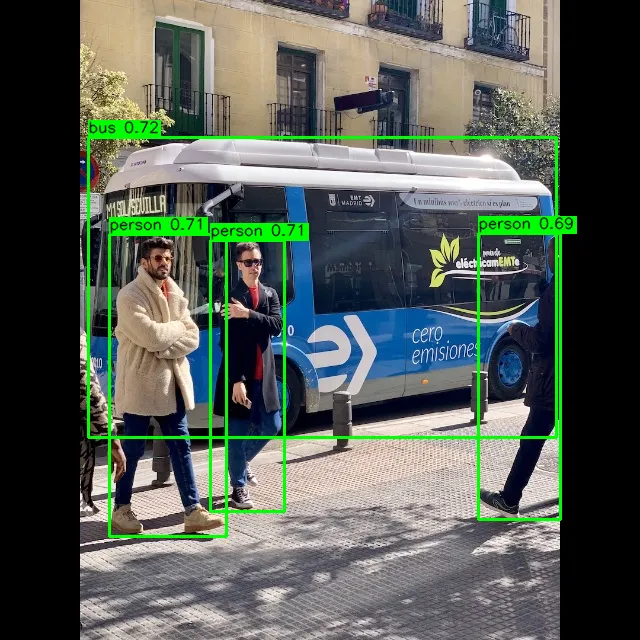
- 推理结果:
5. 总结
Python(RKNN-Toolkit-Lite2)方案: 适用于快速验证与功能调试,开发效率高,能够直接结合 OpenCV 等工具完成推理流程搭建,但依赖 Python 运行环境且预处理主要由 CPU 完成,整体性能与实时性相对有限。
C/C++(Native API)方案: 适用于产品部署与高性能场景,通过调用底层 RKNN 接口并结合 RGA 等硬件加速实现高效推理与预处理,占用资源低、实时性强,但开发与调试复杂度较高,适合最终量产使用。